FormInput component
The FormInput component is a reusable input field designed for integration with useFormik composable. It handles field value updates, validation errors, and accessibility attributes automatically. With support for customization through props, it ensures consistent styling and behavior across forms while simplifying form logic.
Props:
| Name | Type | Required | Description |
|---|---|---|---|
| formik | object | false | The Formik instance manages form state, validation, and field values. Using Vue’s provide/inject, the Formik instance can be passed to child components. If no props are provided, the component searches for a parent Formik instance and throws an error if none is found. |
| name | string | true | The name of the form field, used to identify the field in the Formik instance. |
| label | string | false | An optional label for the input field. If provided, it is displayed as a field label. |
| placeholder | string | false | An optional placeholder for the input field. It is displayed inside the input when no value is present. |
| type | string | false | The type of the input field (e.g., 'text', 'password', 'email'). Defaults to 'text' if not provided. |
| readonly | boolean | false | Determines if the input field is read-only. Defaults to false. |
| disabled | boolean | false | Determines if the input field is disabled. Defaults to false. |
| required | boolean | false | Determines if the input field is required. Defaults to false. |
| readonly | boolean | false | Determines if the input field is read-only. Defaults to false. |
| inputProps | object | false | Additional props to pass to the input field, such as attributes like 'min', 'max', 'step', etc. |
| validation | InputValidationRule | false | Optional field-level validation rule (value, values?) => string | string[] | undefined. It is registered with the form, runs alongside schema validation, and takes precedence for this field. |
Slots
| Name | Description |
|---|---|
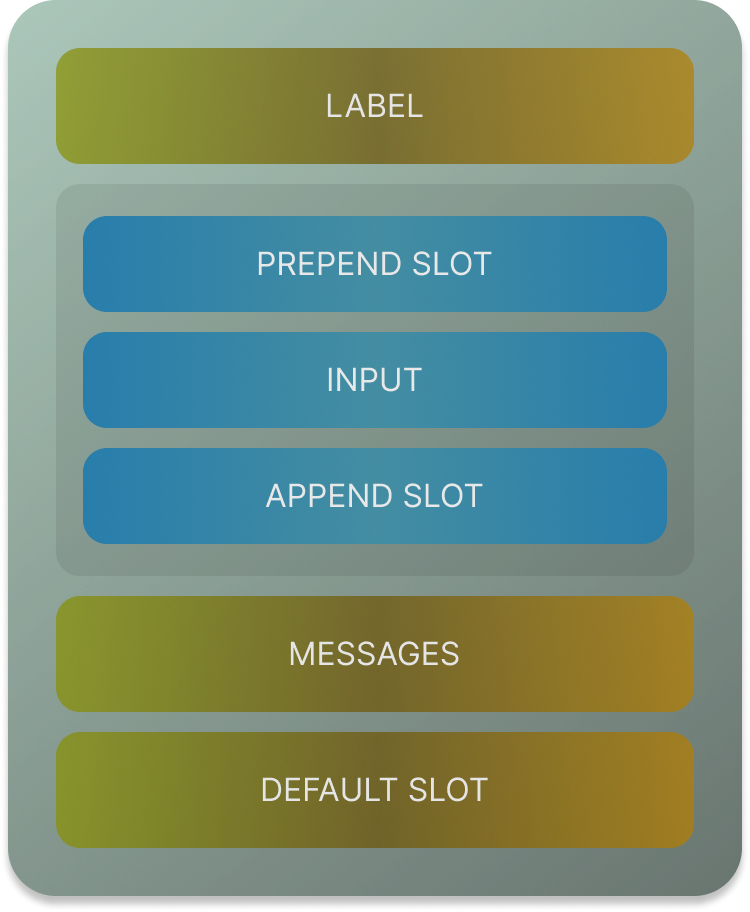
| default | Slot for rendering additional content or components inside the input container, below the input field. |
| prepend | Slot for rendering content or components before the input field, such as an icon or label. |
| append | Slot for rendering content or components after the input field, such as an action button or icon. |
Usage:
If your field has array of values then you can use the name like:
Class Naming Style
- Base Class: The base class for this component is
vf-field. It serves as the primary identifier for the component and provides the foundational styles. - Dynamic Type-Specific Classes: The component applies a type-specific class dynamically using the
typeprop.
For specific types (e.g.,password,email), the classes will bevf-password-fieldorvf-email-field, respectively. - Modifier Classes: These classes modify the appearance or behavior of the base component:
vf-field--error: Applied when the field has a validation error, determined byformik.hasFieldError(name).vf-field--disabled: Applied when the field is in a disabled state, determined by thedisabledprop.vf-field--readonly: Applied when the field is set to read-only, determined by thereadonlyprop.
- Input Element Classes: Classes applied specifically to the
inputelement within the component:vf-input--error: Indicates an error in the input field, applied whenformik.hasFieldError(name)is true.vf-input--disabled: Marks the input as disabled, determined by thedisabledprop.vf-input--readonly: Marks the input as read-only, determined by thereadonlyprop.
- Error Message Class:
vf-error: Used for displaying error messages below the input field. The error message is rendered whenformik.hasFieldError(name)is true.
- Dynamic Behavior: Classes and attributes are applied conditionally based on the component's props and state:
- The
vf-field--errorandvf-input--errorclasses are applied whenformik.hasFieldError(name)is true. - The
vf-field--disabledandvf-input--disabledclasses are applied when thedisabledprop is true. - The
vf-field--readonlyandvf-input--readonlyclasses are applied when thereadonlyprop is true. - ARIA attributes like
aria-labelledby,aria-describedby,aria-invalid,aria-required,aria-readonly, andaria-disabledare applied dynamically to enhance accessibility.
- The